
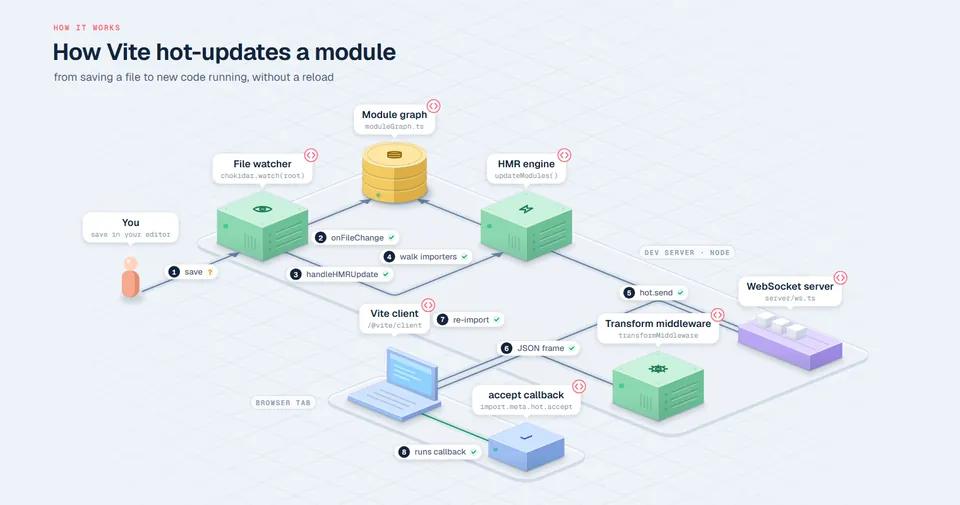
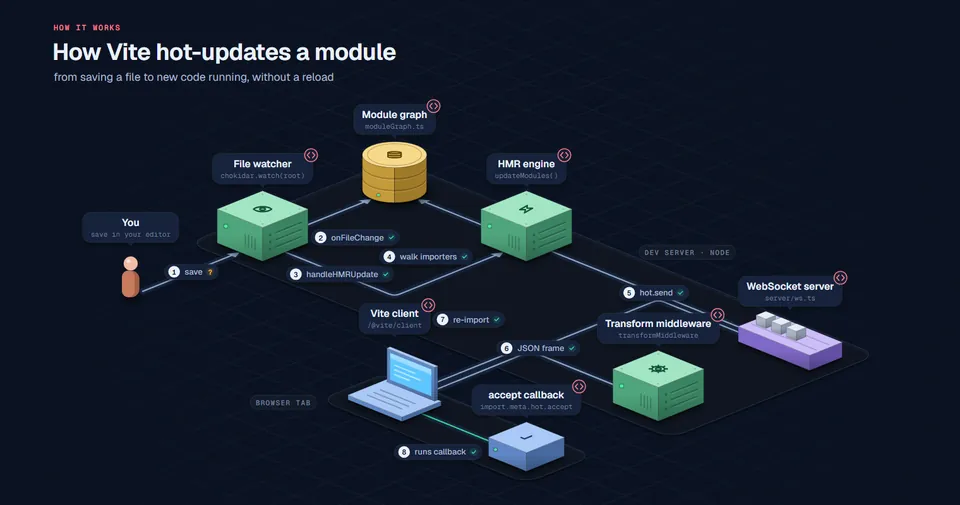
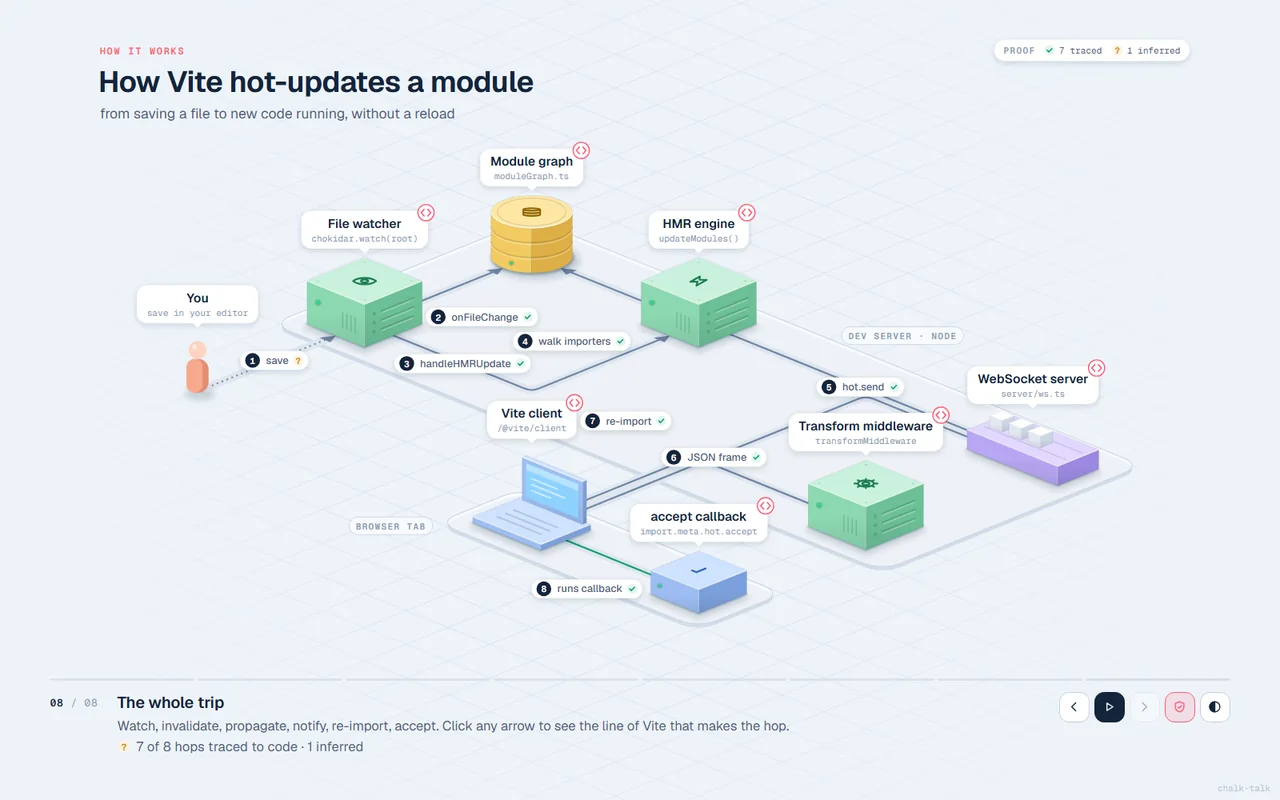
How Vite hot-updates a module
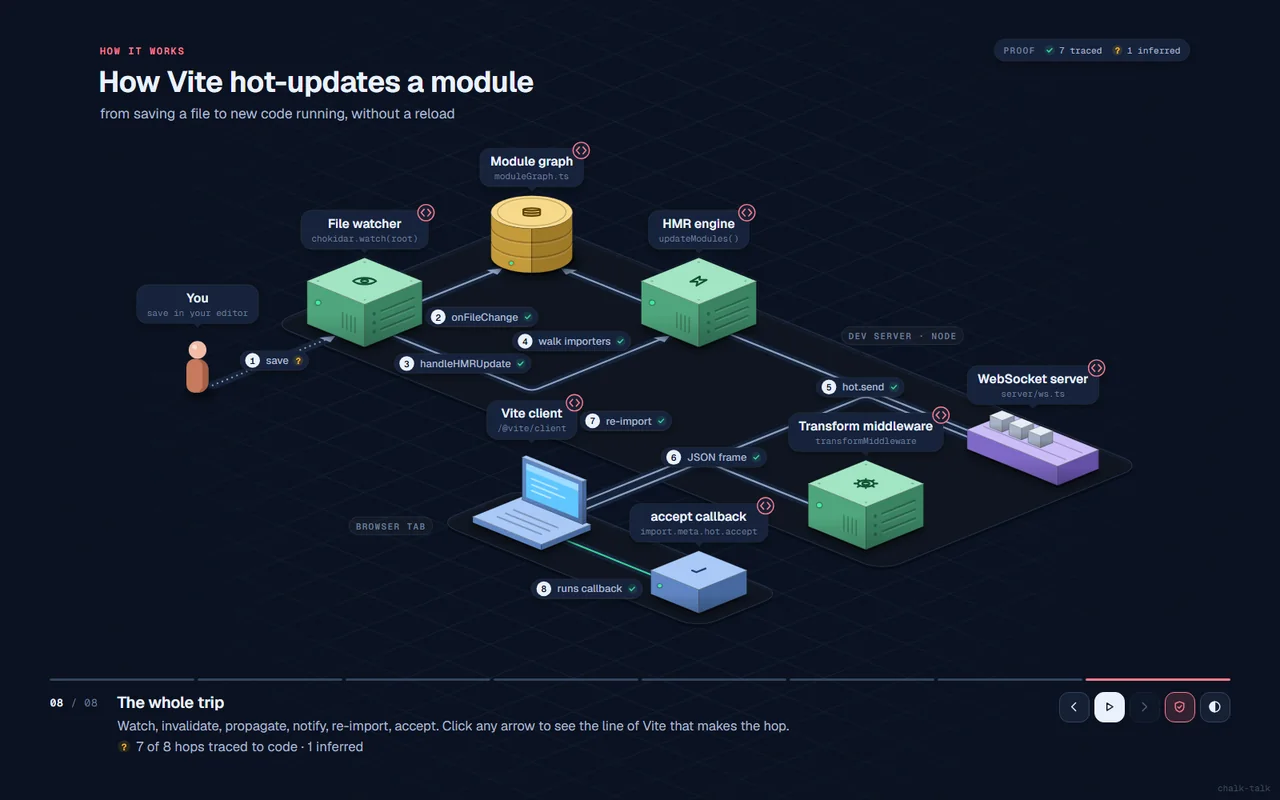
From saving a file to new code running in the tab, without a reload.
Ask your coding agent how something works. Get a step-by-step animated walkthrough of the real code path in one HTML file, where every arrow is traced to a real line of code, or honestly marked as a guess.
/plugin marketplace add oztrkemree/chalk-talk
/plugin install chalk-talk@chalk-talk
$ npx skills add oztrkemree/chalk-talk
$ git clone https://github.com/oztrkemree/chalk-talk
$ cp -r chalk-talk/skills/chalk-talk ~/.claude/skills/
# or your agent's skills folder
Then just ask: how does auth work in this repo?
Works withClaude CodeCodexCursorGemini CLIOpenCodeCopilotvia the Agent Skills standard


LIVE How Vite hot-updates a module · vitejs/vite · 7 of 8 hops traced → step P play V proof view click a block for its code Open full page ↗
Diagram tools draw what might connect. chalk-talk only draws a hop when it can point at the line that makes it. The build opens the cited file, finds the call inside the cited lines, and marks the result on the arrow.
✓The file and lines exist, and the call that proves the hop was found in them, like hot.send({ in server/hmr.ts:783-794. Click the arrow and that line is highlighted.
?Some hops have no single line: a network boundary, an OS event, framework magic. The agent says so and says why. In proof view these turn dotted.
!Cited code that isn't there, or doesn't contain the call. The build prints a warning, the arrow turns red, and the agent fixes the scene before you ever see it.
$ node build.mjs vite-hmr.scene.json
proof: 7/8 hops traced to code (7 verified, 0 cited) · 1 inferred · 0 broken
$ node build.mjs my-talk.scene.json
WARNING proof: edge reply -> calls "res.send(" not found in src/app.js:10-20
Each of these was written by an agent reading the actual source, pinned to a commit. Open one, step through it, click any block or arrow label to read the code it stands for.
From saving a file to new code running in the tab, without a reload.
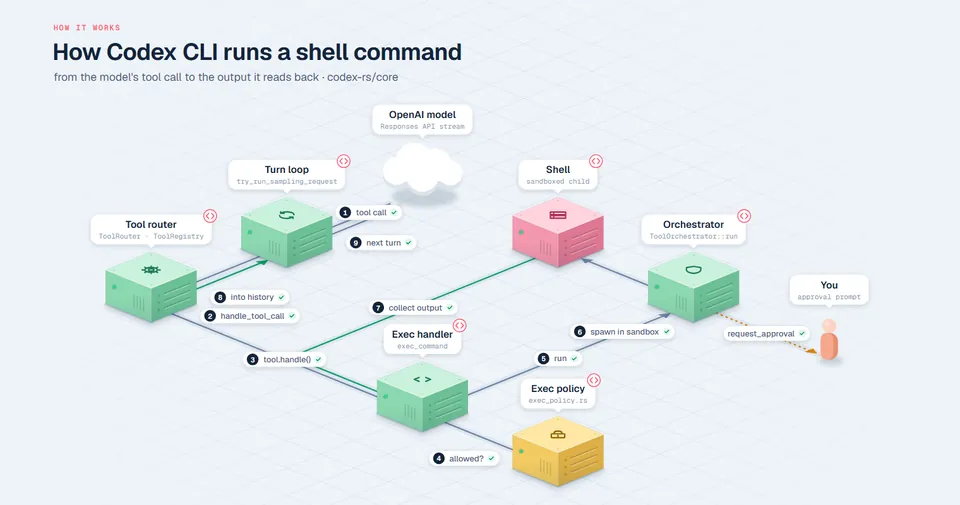
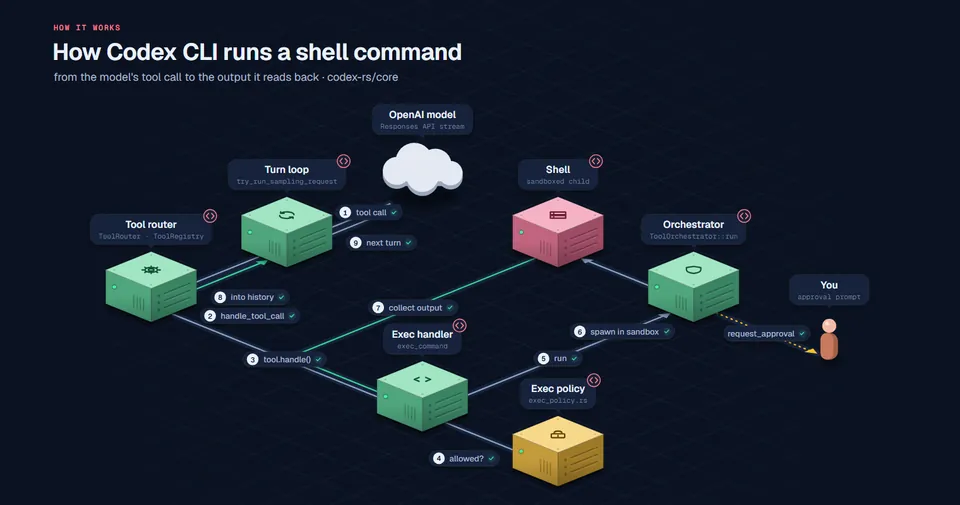
From the model's tool call through approval and the sandbox, back to the output it reads.
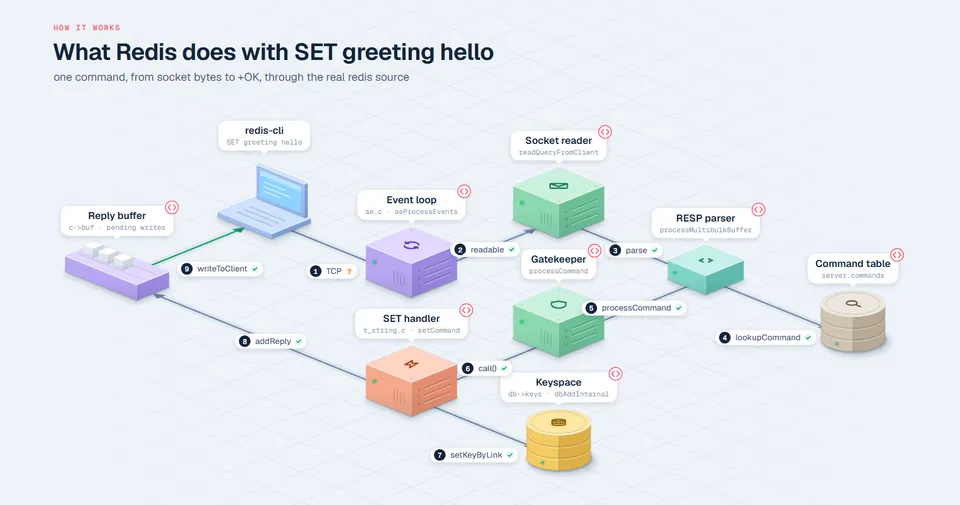
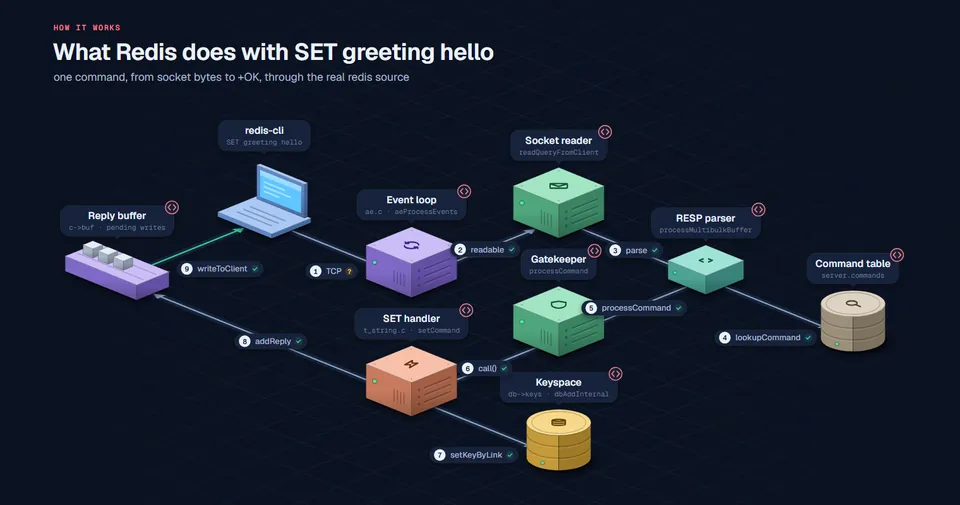
One command, from socket bytes to +OK, through the real redis source.
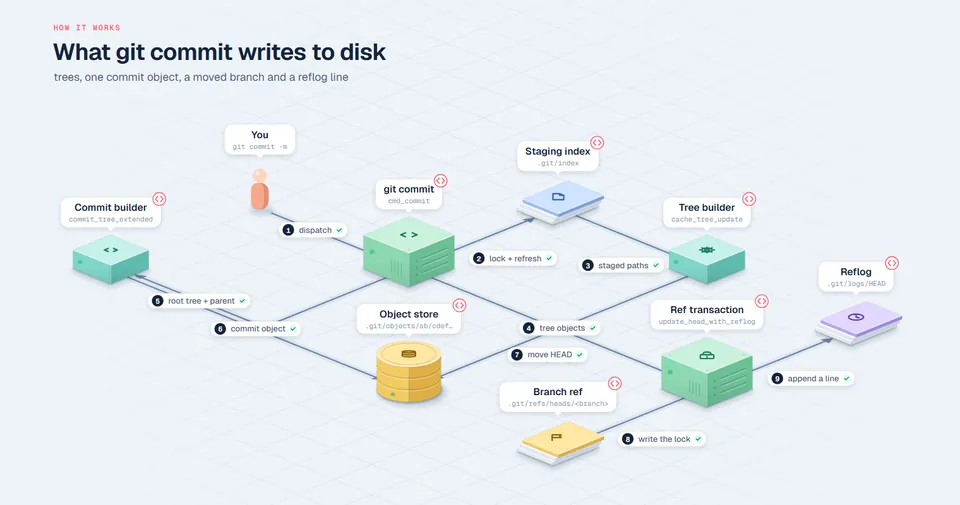
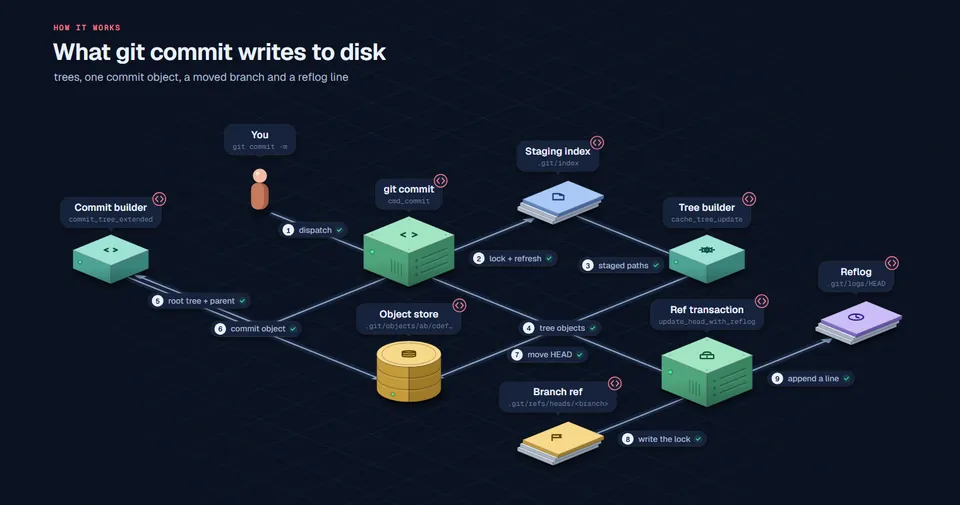
Trees, one commit object, a moved branch and a reflog line.
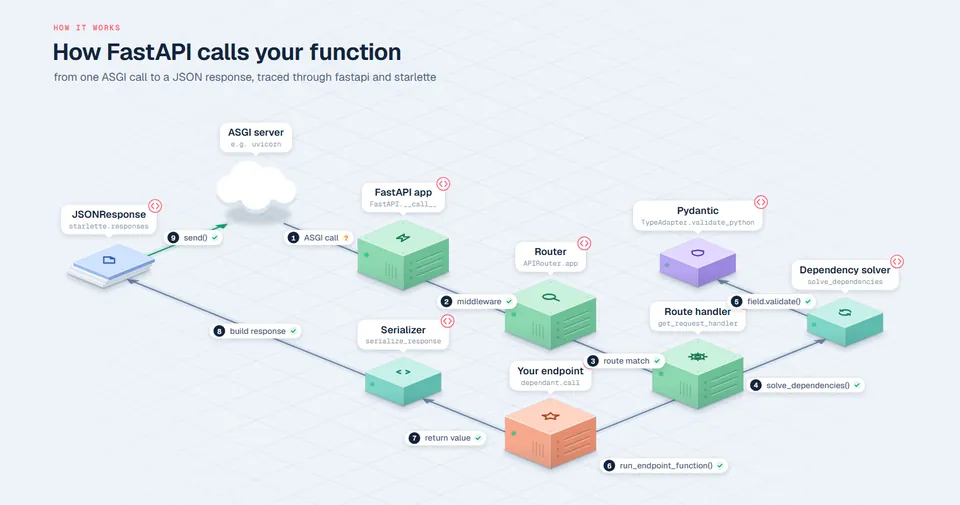
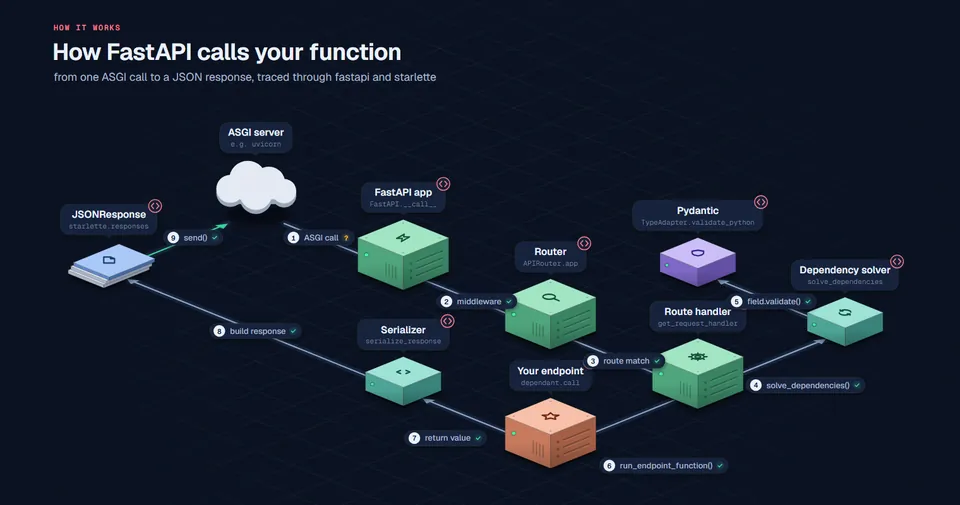
From one ASGI call to a JSON response, through fastapi and starlette.
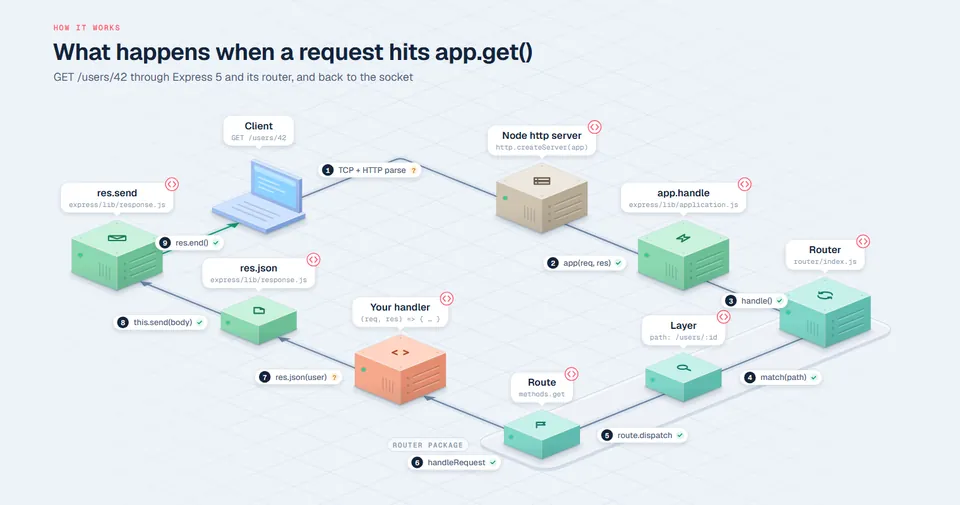
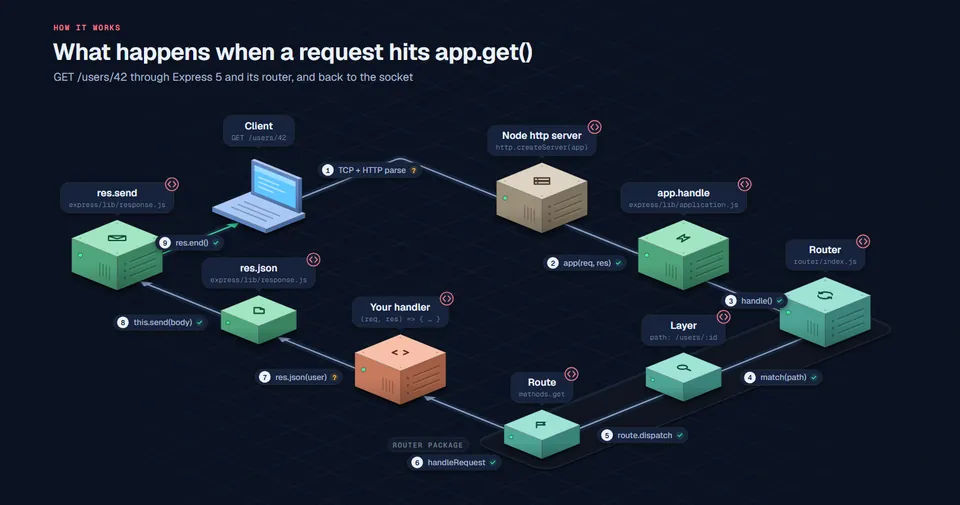
GET /users/42 through Express 5 and its router, and back to the socket.
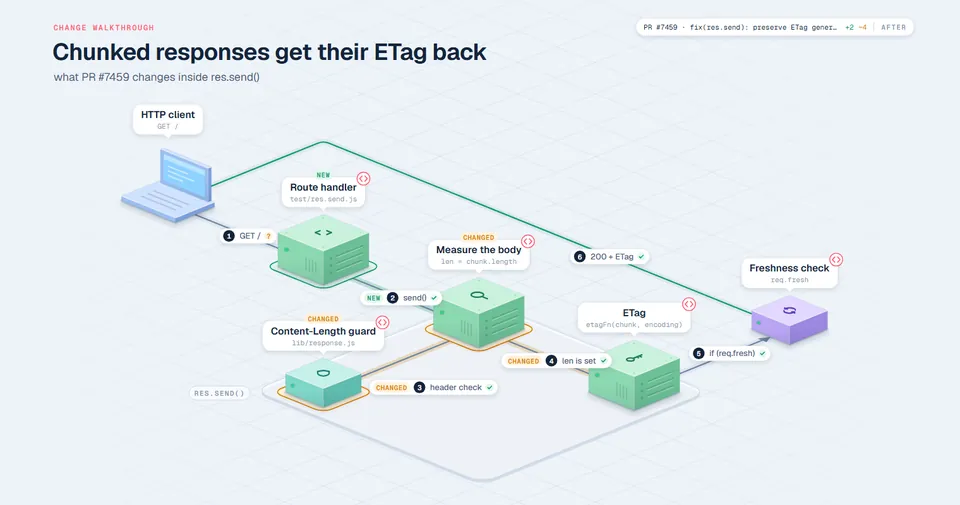
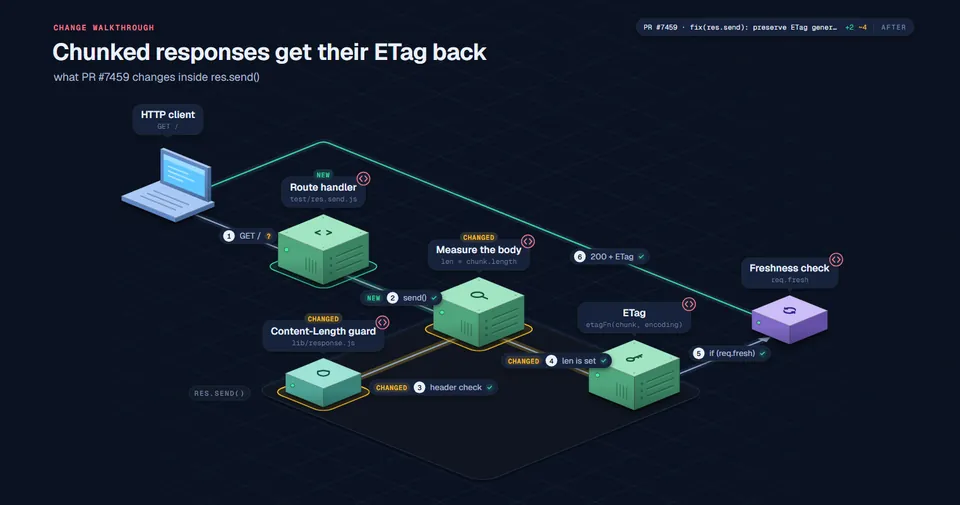
What one pull request changes inside res.send(). Change mode tags each part NEW, CHANGED or REMOVED on the journey, and D flips between the code before and after the PR.
chalk-talk explaining itself, plus concept talks that need no repo: an idea, a protocol, a plan, in any language.
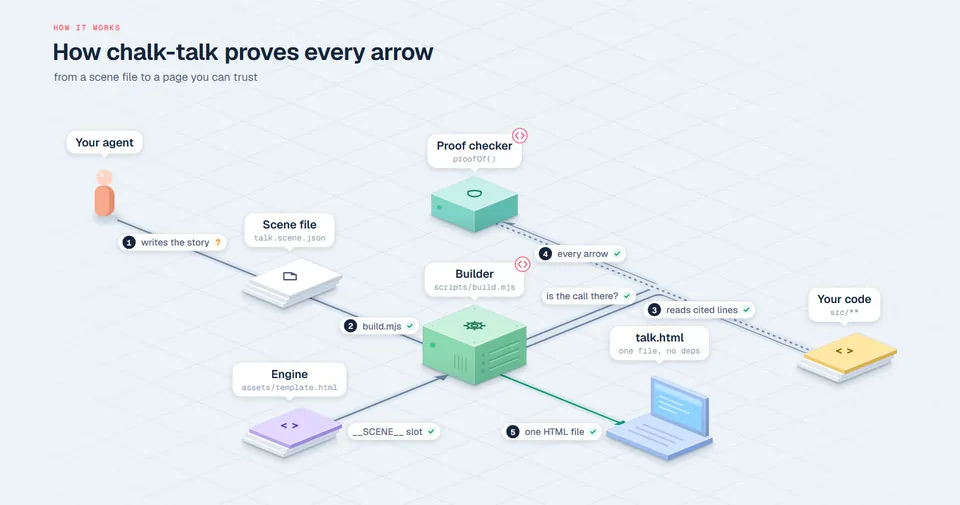
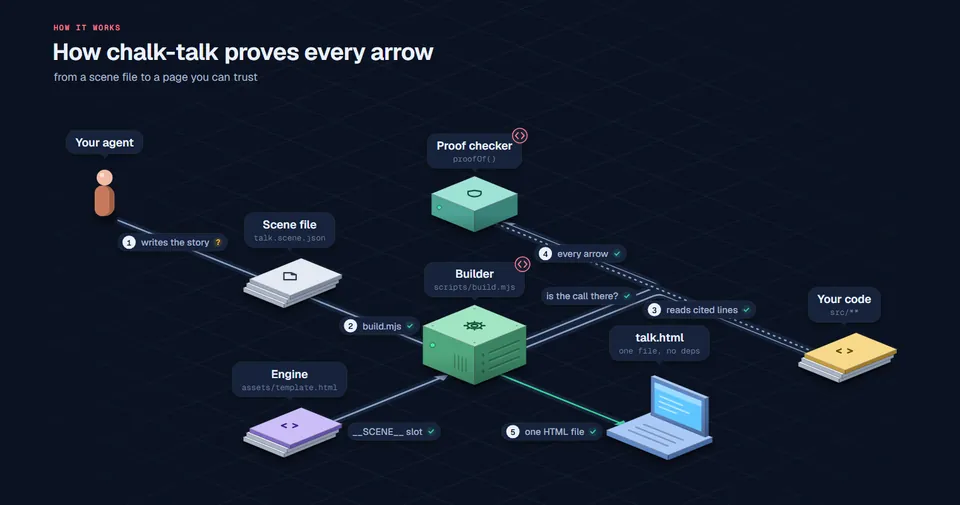
This repo explaining itself.
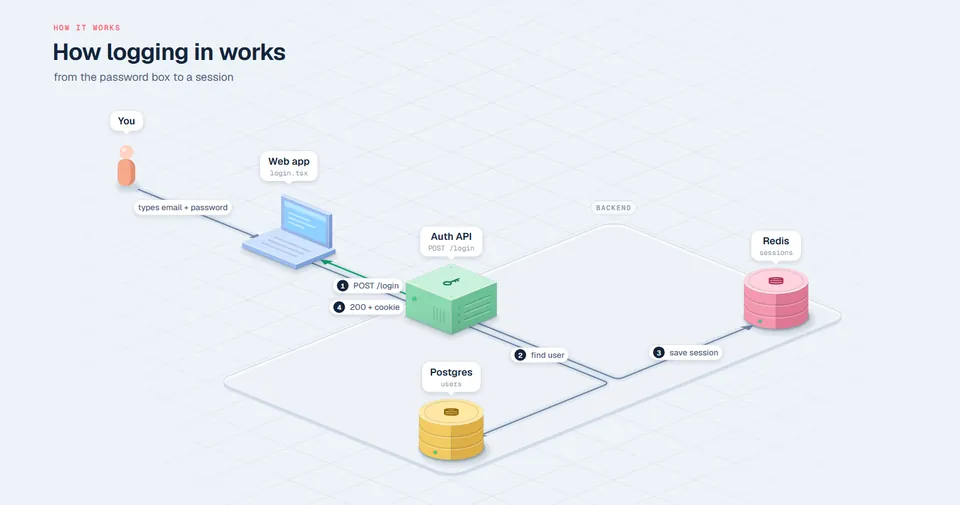
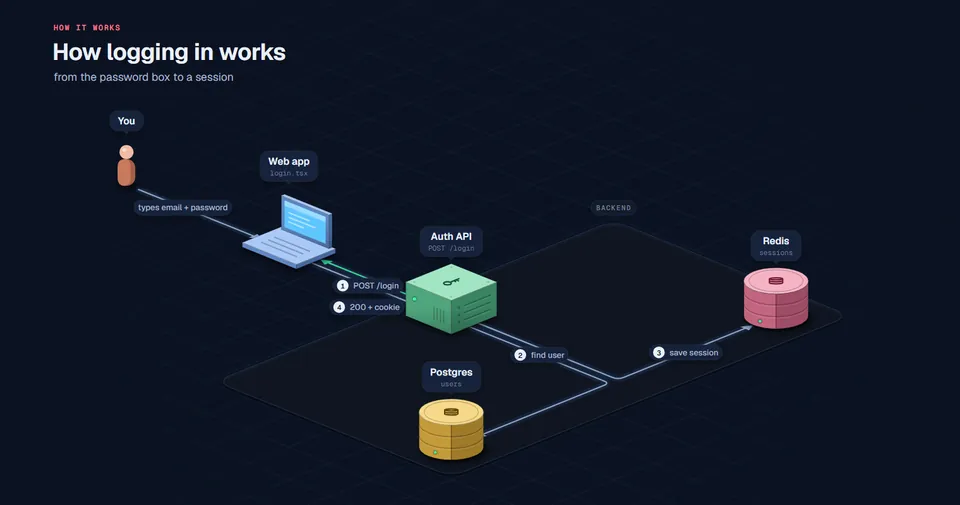
Password, hash check, session, cookie.
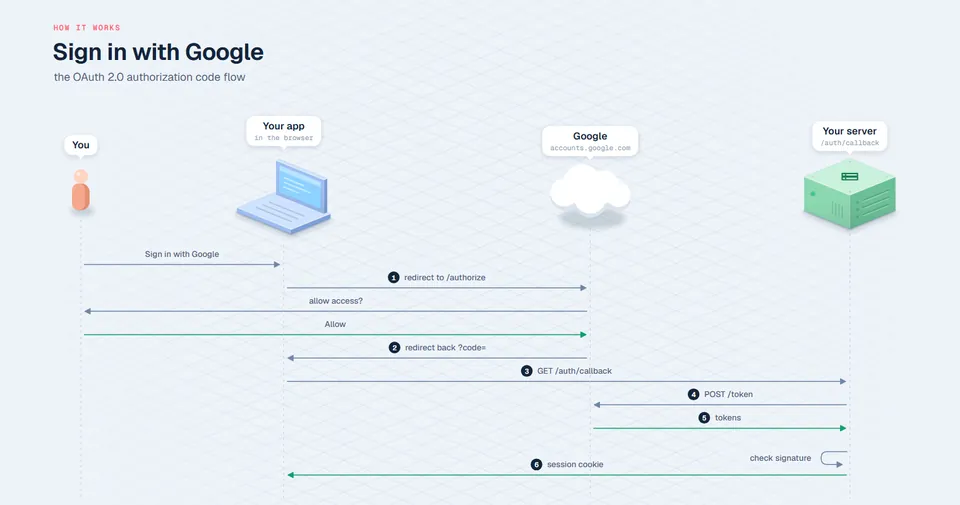
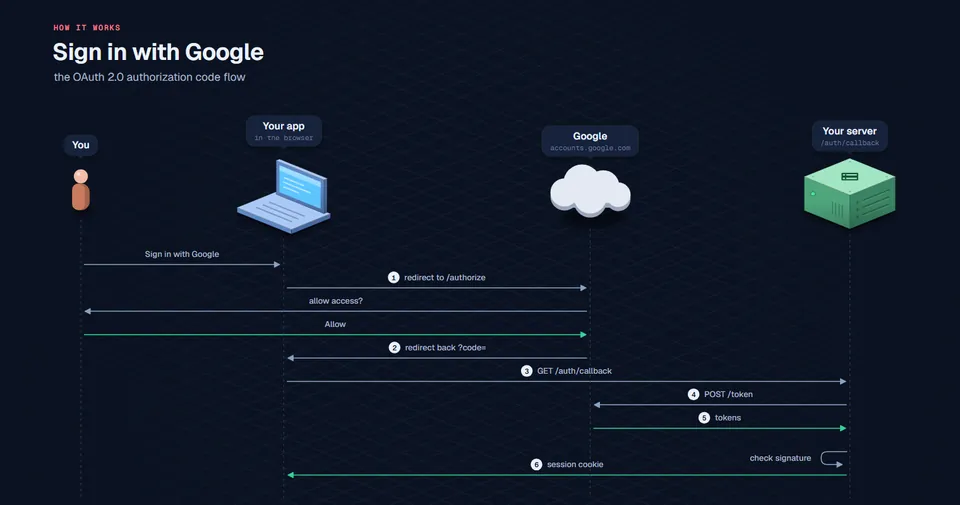
OAuth 2.0, message by message.
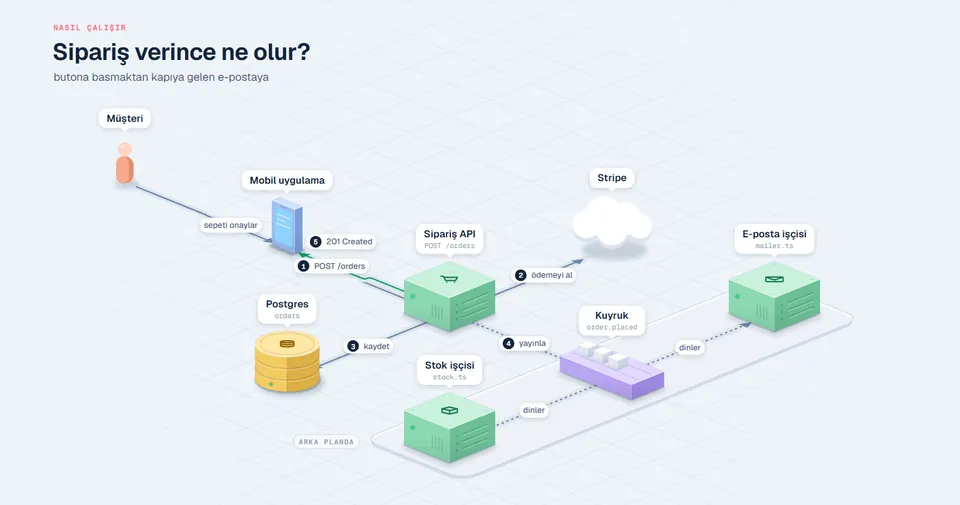
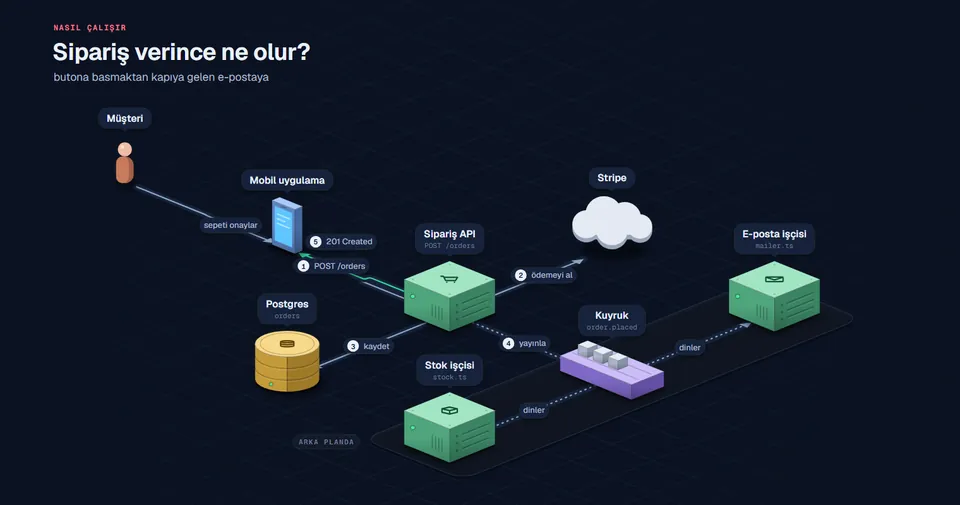
An order flow with a queue and workers.
One scene file, several looks. Add ?style=chalk to any talk (or "style": "chalk" to the scene) and it is drawn by hand on a green board, proof marks and all. Flip it here:


LIVE What git commit writes to disk · git/git · 9 of 9 hops traced Open full page ↗
Your agent never writes SVG. It writes a short scene file; a dependency-free engine does layout, routing, labels and proof, and hands back one HTML page.
“How does a hot update reach the browser?” In plain words, in any language.
It picks one journey and writes scene.json: blocks, arrows, steps, and the file and lines behind each one.
build.mjs opens every cited range, verifies the calls, embeds the snippets with GitHub permalinks.
check.mjs screenshots every step so the agent looks before you do. Then it opens for you.
{ "id": "send", "from": "hmr", "to": "ws",
  "label": "hot.send", "packet": "update",
  "code": { "file": "packages/vite/src/node/server/hmr.ts",
            "lines": [783, 794] },
  "calls": ["hot.send({", "type: 'update'"] }

{ "id": "save", "from": "you", "to": "watcher",
  "inferred": "the OS file event reaches chokidar
outside Vite's code" }update or SELECT travel the arrows in order.A new teammate gets the request path, the job queue and the auth flow as walkthroughs they can click into, not a stale wiki diagram.
walk me through what happens when a webhook arrives
Your agent wrote 2,000 lines this afternoon. Ask it to show you how they fit together, with every claim pinned to a line you can check.
show me how the retry logic you just wrote actually runs
Change mode marks what a branch adds, changes and removes on the journey, with a before/after toggle. Attach the file to the review. See Express PR #7459
explain this PR as a chalk talk
Step through a protocol, an algorithm or a framework's internals one point at a time, at your pace, in your language, on a projector or a phone.
bu kuyruk sistemi nasıl çalışıyor, çizerek anlat
As accurate as the code it cites, and it shows you which is which. Every arrow is either verified (the build found the cited lines and the call inside them), inferred (the agent explains why there's no single line), or broken (flagged red, with a build warning). The page sums it up, for example “7 of 8 hops traced to code · 1 inferred”.
Captions are still written by a model, so read them like a colleague's explanation: the receipts are one click away.
No. chalk-talk is a skill your agent runs locally: it reads files from your checkout, the build runs on your machine, and the result is a local HTML file. There is no chalk-talk service, account or telemetry; nothing is uploaded. (Your agent talks to its own model provider as it always does.)
Sharing a talk? CHALK_SHARE=1 leaves your local file paths out of the page; GitHub permalinks stay.
chalk-talk doesn't map the whole repo, on purpose. Each talk follows one journey (“a request hits the router”, “an order becomes an email”) in six to ten steps. Ask for as many talks as you need; the agent only reads the files on that path.
Any agent that supports the Agent Skills standard: Claude Code, Codex, Cursor, Gemini CLI, OpenCode, GitHub Copilot and others. The code can be in any programming language, and captions can be in any human language.
No. The output is one self-contained HTML file with the code snippets embedded. It works offline; it only fetches its web fonts when online and falls back to system fonts otherwise.
Yes. Keep the scene.json next to the HTML and ask for changes (“split step 3”, “show the retry path”); the agent edits the scene and rebuilds. You can also build by hand: node build.mjs my-talk.scene.json.
Nothing. It's open source under the MIT license. Use it, fork it, ship it.
Free, MIT, offline. One install, then ask in your own words.